Monitoring macOS Temperature in the Menubar
You'd think it's a built-in feature

Mercury (Hermes). Wood engraving by Jonnard after W.B. Richmond, 1866.
._Wood_engraving_by_Jonnard_after_W.B._Richm_Wellcome_V0035817.jpg)
A Trillion Dollar Company, BTW…#
Since Apple doesn’t provide an easy way to keep an eye on your hardware’s health, “power users” often resort to community made solutions. Some popular choices being stats, Hot, or the classic coconutBattery. Apple does allow ways to track these metrics, but using powermetrics or creating a script or an alias isn’t accessible for the most part, especially not the best user experience when I just want to know how hot my machine is at this moment.
Existing Solutions#
Naturally us humans can’t agree on a single thing, someone wants this, or that, or just something entirely new. It applies on many levels. Feature scope is one thing, but paywalling is just a sin. Especially in this day and age of “Vibe-Coding”, at least in my point-of-view.
I was using free version of coconutBattery for the longest time, since version 3 on my now retired media server. I’ve been using version 4 on my M1 laptop to monitor my battery temperature without any issues… until recently.
Numbers don’t lie… Until they do#
I monitor my battery temperature because it’s what I grew accustomed to with coconutBattery, and I’ve found it to be a ‘good enough’ metric for general status of my machine, especially in a laptop context. I can also get a general baseline of my machine and the usual temperature range it operates in, which gives me some understanding as to the workload the laptop is currently handling as well as the environment temperature in some extreme cases.
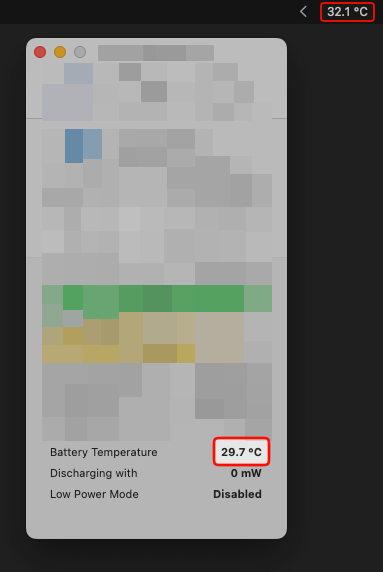
Not that big of a difference, but there’s a delay…
How?#
I noticed some delay in temperature updates while I was just running some useless builds. Then I decided to investigate, and there it was. I knew the keyboards felt a bit cooler and it was reporting low 30s, which got me curious.
Why?#
I’ve recently came across spank, which is an accelerometer based program that detects if you’ve physically hit your M-series MacBook, and talks back to you. This inspired me to do something with one the sensors, and temperature sensor was one of the first physical sensors that I got to work on with an ESP32, so I just figured why not?
My end goal here is different since I’m not trying to create a new fabric or a material to be able to read temperature with, plus all the work of decoding SMC key has already been done by the community so I just have to glue some things together and should be good to go.
Works for me#
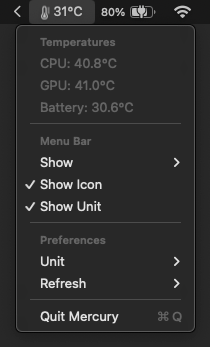 I’ve had to make sure and test the readings and compare it with other ones, which may defeat the purpose, but better be sure to test it against existing work to make sure my readings were at least correct.
Following Apple’s Human Interface Guidelines I’ve attempted to give it a basic and native look and feel to it. The guidelines itself was useful, covering menubar specific best practices.
Few things…#
I’m not sure what kind of real difference there will be for CPU and GPU temp for the laptop since they’re basically right next to each other, but there’s always the case that it could be running on any M-series macOS.
HIG mentions to use icons for the menu bar, but who knows that might be just for Tahoe.
I’ve spent way too much time on designing the logo, and I really hope it’s recognizable.

Final thoughts#
It was a good CI/CD exercise, getting familiar with version tagging, GitHub workflows for automatic DMG builds for releases, creating a cask for brew so it could also be downloaded using a command.
I also had a fun time figuring out that every iOS major design release has it’s own “squircle” ratio, because when designing a new icon using the new Icon Composer, the squircle ratio is set for Tahoe’s icons, which provides the liquid glass look. However, this creates black corners when exported and used as an icon for Sequoia (15.7.4) and I refuse to upgrade to Tahoe, even though I’m running XCode 26.3 and for some reason designing icons using liquid glass design. It was annoying when I didn’t realize what was happening, but I believe that it could be fixed in the future versions since it’s still in beta release.
I’m not sure if there’s more to do with the Mercury project itself at this point, it does everything I want, and the biggest file size contributor is the app icon…